A first-glance check before submittal
Run it the way a permit tech and plan reviewer would read your set: cover-sheet data, adopted codes, life-safety basics, then sheet by sheet.
BC-Check · Now available in FL & AZ
Catch the plan-review comments before the plan reviewer does. BC-Check reads your plan set, locks to the project's jurisdiction and its adopted codes, and returns a first-glance list of likely comments, sheet by sheet, before you submit.
Why BC-Check
Most plan-review comments are not deep code questions. They're a missing code list, the wrong edition on the cover sheet, an egress window that's 2" off, a property record that doesn't match, or a product approval that was never linked. BC-Check is built to catch those first.
Run it the way a permit tech and plan reviewer would read your set: cover-sheet data, adopted codes, life-safety basics, then sheet by sheet.
Each finding comes with the citation, what was found, and the drawing change that fixes it, so the fix goes on the sheet before the reviewer has to ask.
If information is missing, BC-Check says needs info rather than guessing. If an adopted edition can't be confirmed, it says Not verified: check AHJ.
How it works
Drop in the plan set PDF, the county property card (PDF or screenshot) and your product approvals (FL Product Approval or Miami-Dade NOA numbers). BC-Check reads the sheet index, cover-sheet data, rooms, openings, alarms and fixtures.
Vector (CAD-exported) PDFs work best. Every extracted value can be reviewed and corrected in the intake form.
The project's address sets the jurisdiction lock. BC-Check resolves the codes that jurisdiction has adopted (state, county or city, with local amendments flagged) and checks only against them.
Each edition shows its official source and the date it was last verified.
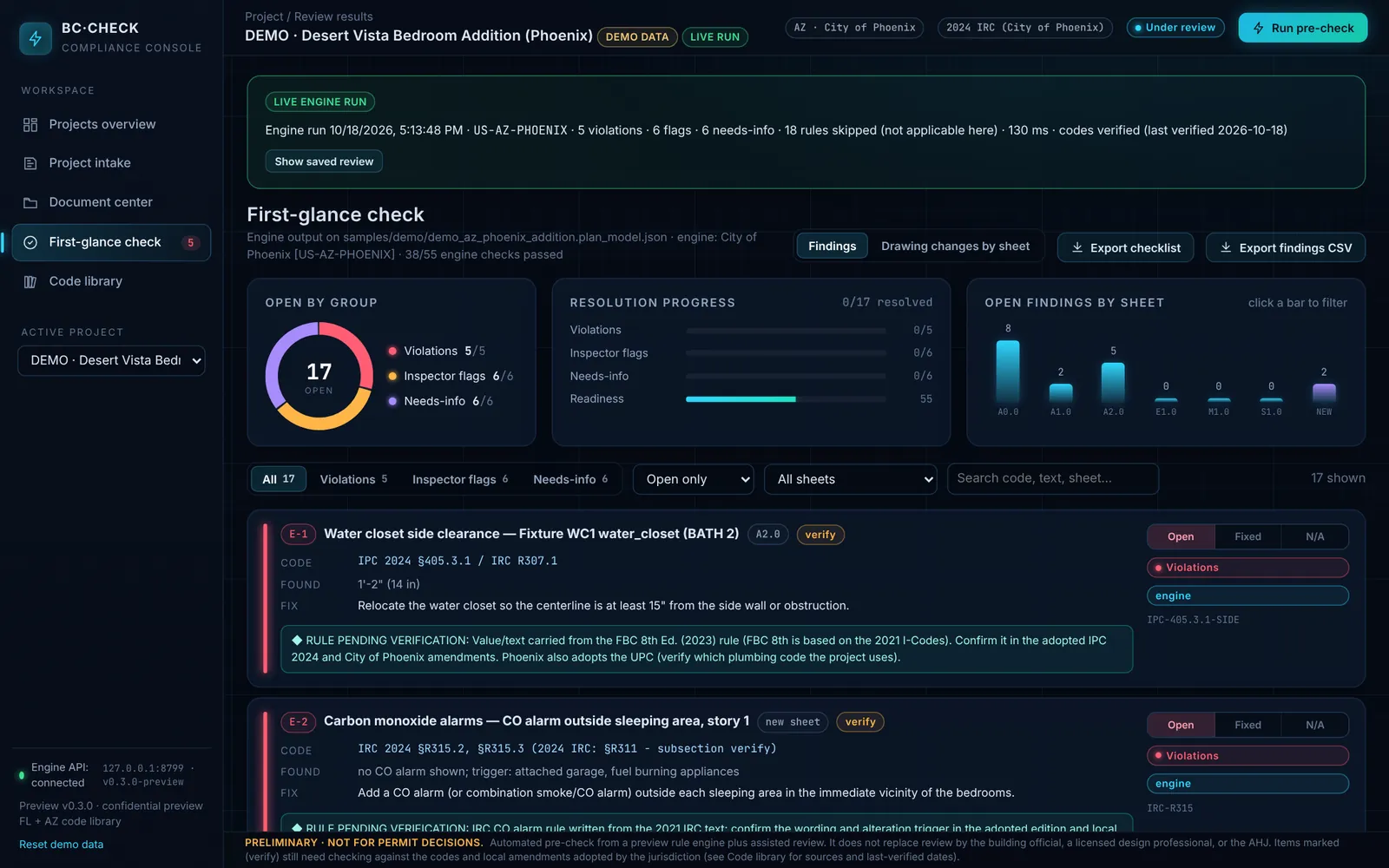
Findings are grouped as violations, inspector flags and needs info, each with a citation and a fix, and turned into a drawing-change checklist per sheet. Export to CSV or a Markdown checklist.
Mark items fixed or N/A, and re-run as the drawings change.
Features
A Florida project can't be checked against Arizona codes by accident. The code library and the check are locked to the project's state; other states are browsable only in read-only reference mode.
Adopted codes per jurisdiction, with effective dates, official source links and last-verified dates. Refresh from the source on demand; differences are flagged for review, never changed silently.
Parcel, legal description and address vs the cover sheet; parcel county vs jurisdiction; existing heated area, bedrooms, land use, zoning district, lot coverage and setbacks vs lot size.
Each window and door approval is checked live against floridabuilding.org and Miami-Dade's NOA database. Missing, expired, superseded or wrong-product-type approvals are flagged, and so are approval sheets missing from the set.
Backed by 193 automated software tests.
The project address sets HVHZ status. BC-Check confirms each approval is valid for HVHZ use, checks impact protection, and compares rated vs required design pressure. Size-specific limits are flagged verify. Optional basic roof and connector documentation checks. Not an engineering review.
Backed by 193 automated software tests.
Every open finding becomes a concrete drawing change on the sheet where it belongs: cover sheet, site plan, floor plan, or a new sheet to add.
Export findings to CSV for Excel, a Markdown drawing-change checklist, or a full PDF/HTML report to share with your team.
Inside BC-Check
Shown with synthetic demo projects and one real permit set with all client data removed.
Our comprehensive, state-of-the-art dashboard lets you see your project the way the building inspector will. A submittal this organized shows your attention to detail and gives the inspector confidence that every requirement has been addressed.
Coverage
We add states one at a time, with each jurisdiction's adopted codes and sources researched before it goes live. Select a state for details.
Getting started
Short version for buyers. A printable copy is on bc-check-instructions.html.
Pick by sheet count: Small up to 10 sheets ($40), Standard up to 25 ($99), Large up to 40 ($149). Extra sheets are $2 each at checkout. First review is 50% off with code FIRSTCHECK50.
Checkout is on Stripe. You'll receive a receipt and invoice by email.
Gather: the complete plan set as one PDF (vector preferred; scans accepted), the property card / county appraiser record, product approvals (FL Product Approval or Miami-Dade NOA), the energy report, spec / product data sheets, and project info (address, jurisdiction, occupancy, scope).
After payment, send the package on the upload page: one sealed drawing-set PDF, the property card, and supporting documents as separate files. Stripe opens that page from the receipt once the after-payment redirect is turned on. If your confirmation still says we'll email upload instructions, email the files to rtad@architectural-design-intl.net with your Stripe receipt number in the subject.
BC-Check examines every drawing sheet and supporting document you send against the codes adopted by your project's jurisdiction. Because that check is thorough, it isn't instant. When the review is complete, your sheet-by-sheet findings report (violations, inspector flags, needs info, with code sections) is emailed to the address you used at checkout. We'll email you if anything is missing from your submission.
Send the revised set for the same project and the same sheet-count tier.
Uploaded files are deleted automatically 30 days after they arrive, or sooner on request. The AI provider uses zero data retention. See the BC-Check privacy statement.
BC-Check is an automated pre-check. It does not replace plan review by the building official or a licensed professional's judgment.
Pricing
Simple pay-per-review pricing. Pick the sheet count that fits your set.
$40per review
$99per review
$149per review
Extra sheets beyond your tier: $2 each (add at checkout)
FAQ
No. BC-Check is an automated pre-check to help you prepare a cleaner submittal. It does not replace plan review by the building official or a licensed professional's judgment, and it is not endorsed or approved by any building department or code body.
Florida: Florida Building Code 8th Edition (2023) statewide, plus Orange, Seminole, Miami-Dade and Broward counties (including High-Velocity Hurricane Zone checks). Arizona (live, nine jurisdictions): City of Phoenix, City of Scottsdale, City of Tucson, City of Mesa, City of Chandler, City of Tempe, Town of Gilbert, Pima County and unincorporated Maricopa County, on each one's adopted I-Codes (Gilbert is still on the 2018 codes; Tempe accepts 2018 or 2024 through December 31, 2026). Other Arizona cities are not covered yet, and Arizona rule values are still being verified against each adopted edition. Each adoption shows its source and last-verified date.
The current rule library focuses on residential work: one- and two-family dwellings, additions, alterations and garage conversions. It covers items such as emergency escape openings, smoke and CO alarms, stairs and guards, fixture clearances, energy documentation, the code list on the cover sheet, zoning data, property card consistency and product approvals.
BC-Check automatically reads your plan PDF and property card, classifies the sheets and extracts the data, then applies a rule library tied to the jurisdiction's adopted codes. Every finding cites its code section, and everything extracted can be reviewed and corrected before you rely on it.
After checkout, send one PDF of the plan set (vector preferred; scans accepted), the property card / county appraiser record, product approvals, energy report, spec sheets, and the project address. Use the upload page linked from your Stripe receipt. If that receipt still says we'll email upload instructions, email the package instead. Anything missing shows up as needs info, not as a guess. See Getting started.
After Stripe checkout you upload the package on the upload page (or email it, if your receipt still says we'll send upload instructions). Files go to a private bucket used only for your review. Plan sheets are read with our AI processor (xAI) under zero data retention, and your sheet-by-sheet findings report is emailed to the address used at checkout when the review is complete. Uploaded files are deleted automatically 30 days after they arrive, or sooner on request. Card payments are handled by Stripe; we never see your full card number. Read the BC-Check privacy statement.
Adoptions are researched from official sources and stored with their source link and last-verified date. You can refresh from the source at any time; anything that can't be confirmed is shown as Not verified: check AHJ.
The goal is all 50 states. Tell us where you practice in the contact form below, which helps us decide which state comes next.
Small (up to 10 sheets) is $40, Standard (up to 25 sheets) is $99, and Large (up to 40 sheets) is $149 — all per review. Extra sheets beyond your tier are $2 each at checkout. Every review includes a jurisdiction-locked code check (FL & AZ), AI vision sheet review, a sheet-by-sheet findings report, and 1 free re-check within 30 days. Launch offer: 50% off your first review with code FIRSTCHECK50.
Contact
BC-Check is live for Florida statewide, plus Phoenix, Scottsdale, Tucson, Mesa, Chandler, Tempe, Gilbert, Pima County and unincorporated Maricopa County in Arizona. Use the form for questions, firm onboarding, or to tell us which state you need next. Ready to buy? Go to pricing.
Prefer email? rtad@architectural-design-intl.net · (407) 929-1727